Editor
Change the words and photos. Nothing else.
Every site I build comes with Editor. It opens on your own live page, not in a dashboard somewhere else, so you click the sentence you want to fix and retype it. The design is not something to be careful around, because it is not editable at all.
Editor is a desktop tool, and so is this demonstration. On a wider screen this page becomes editable so you can try it. The rest of the page explains it either way.
This page carries a live demonstration that needs JavaScript. Without it, the screenshots below show the same thing.
The Boundary
Where it stops.
Every website builder lets you edit. That is not the difference. The difference is that one wrong drag on a builder is a broken layout, so most people stop touching their own site within a month and go back to emailing someone.
Editor reaches text and photos. Not by locking the rest behind a warning, but because the rest is not in the tool. There is no setting to get wrong, no panel to open by accident, and no way to paste something in that breaks the page.
Yours to change
- Headings, paragraphs, and list items
- Button and link labels
- Photos, from your library or your own upload
- The description that goes with a photo
Not in Editor
- Layout, spacing, and where things sit
- Fonts, colours, and anything visual
- The menu, and adding or removing pages
- Forms, embeds, and anything in the code
Need something from the second list? There is an Ask button at the bottom of the panel. It emails me with the page you were on, and you carry on with the rest.
The Tool Itself
Not a mockup.
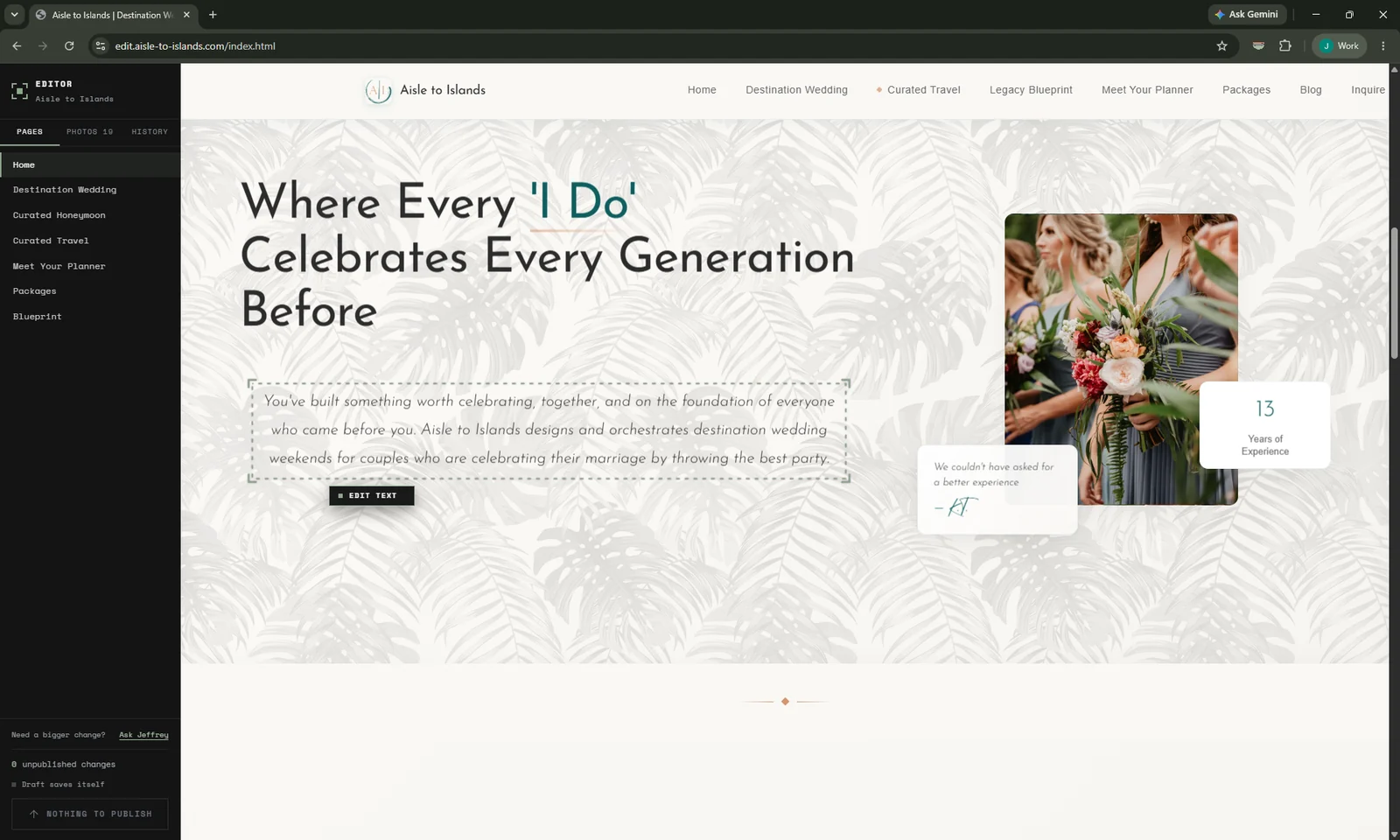
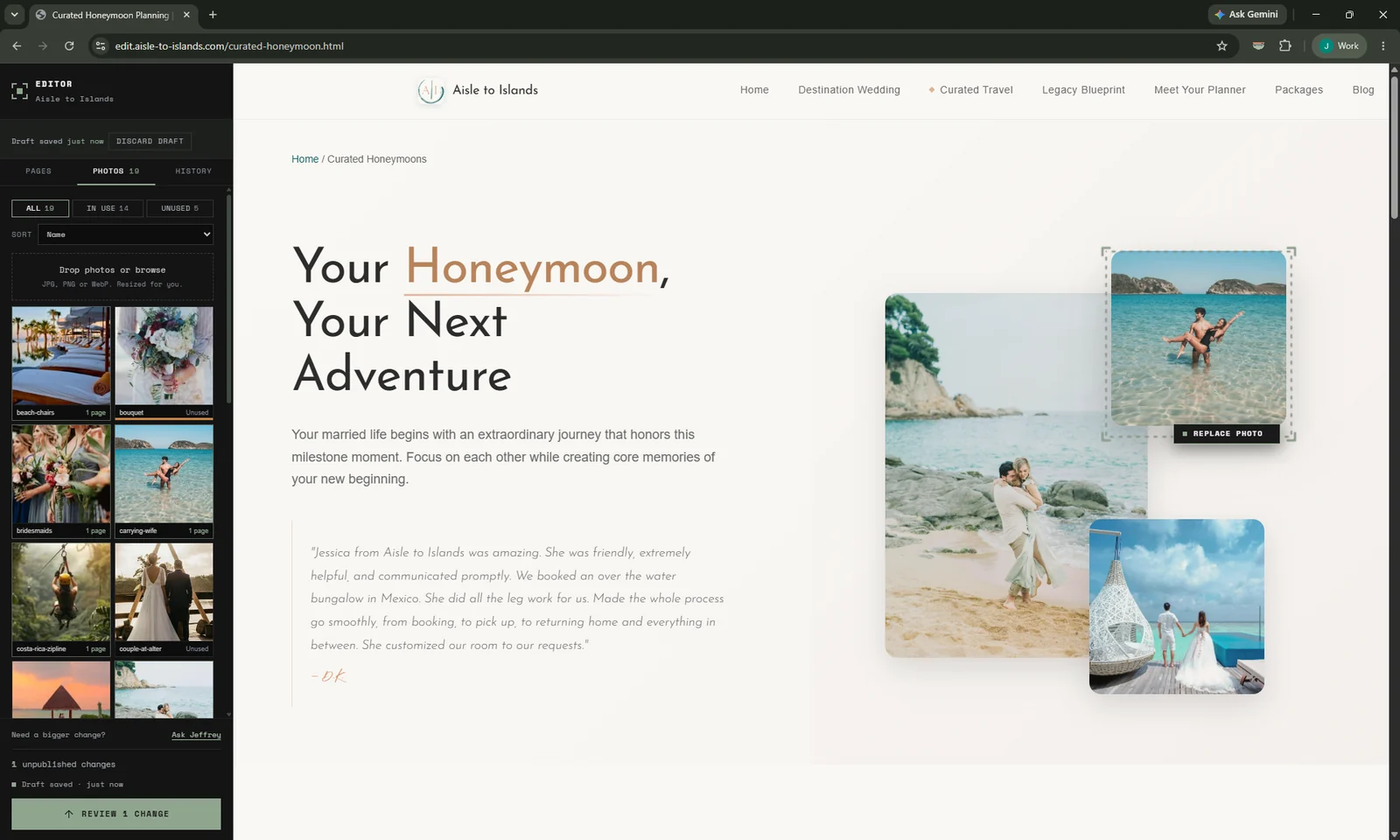
Five frames from Aisle to Islands, a wedding planning business running Editor since October. The browser chrome is left in on purpose: the address bar is the part that shows this is a live site and not a drawing of one.
On a real site
Click the sentence, type
The panel lists the pages. The page beside it is the live one, at its real address. A paragraph picks up a frame and a label, and that is the whole interaction. Everything a client does starts here.
Your library
Drag one in and it is handled
Drop a photo straight off your camera or phone. It is resized and converted before it ever leaves your browser, so a 423 KB original lands on your site at 62 KB and your pages stay fast. Every photo is labelled with how many pages use it, so you always know what is safe to replace and what is sitting unused.
One photo
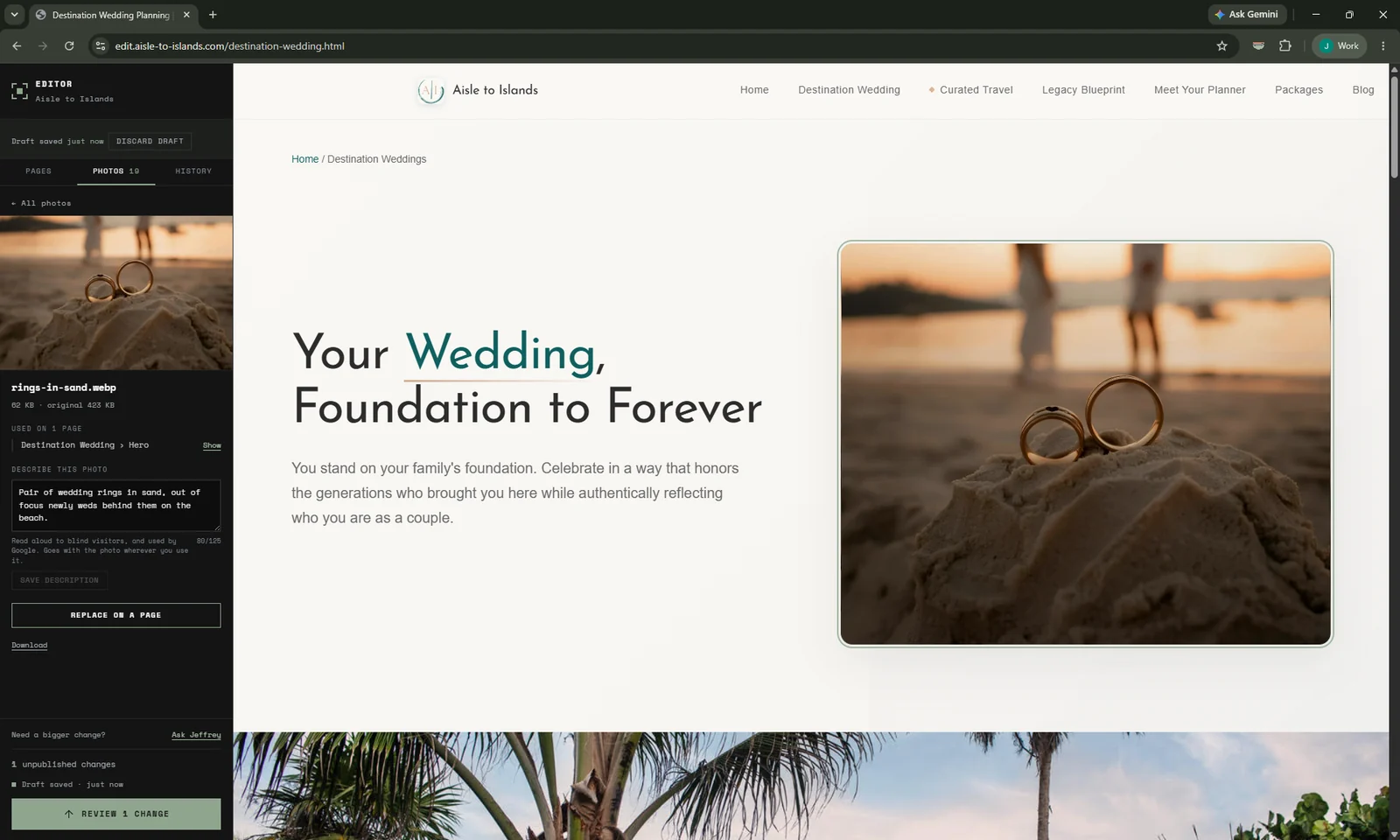
The description belongs to the photo
Each photo carries its own description, the one read aloud to blind visitors and read by Google. It travels with the picture everywhere it appears, so when you swap an image its description goes with it. A photo is never left being described as the one it replaced, which is the quiet error that otherwise sits on a site for years.
Before publishing
Read it back, change your mind
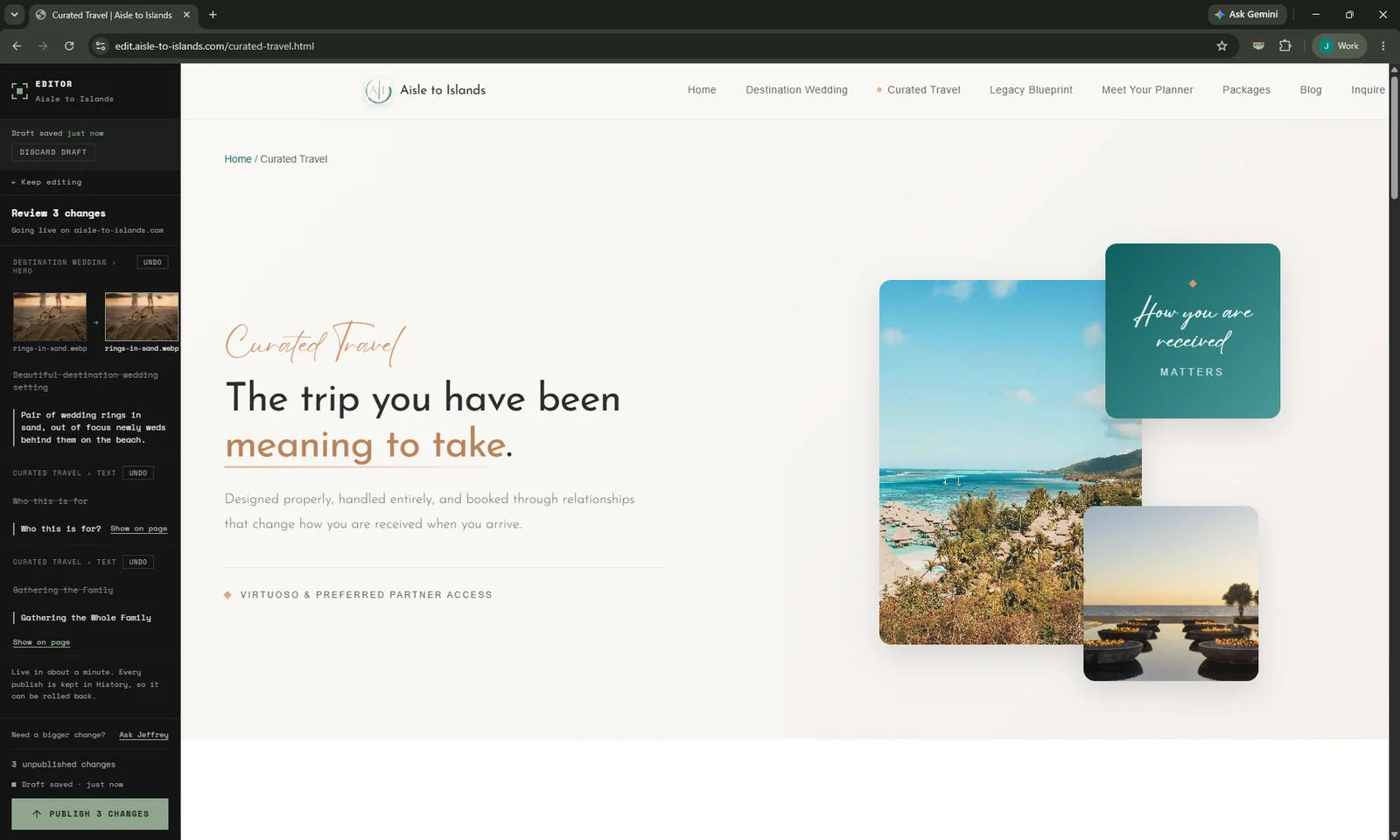
Every pending change is listed with what it was and what it now says, photos included, side by side. Undo any single one of them and publish the rest. Nothing on your live site has moved yet.
After publishing
Every version is kept
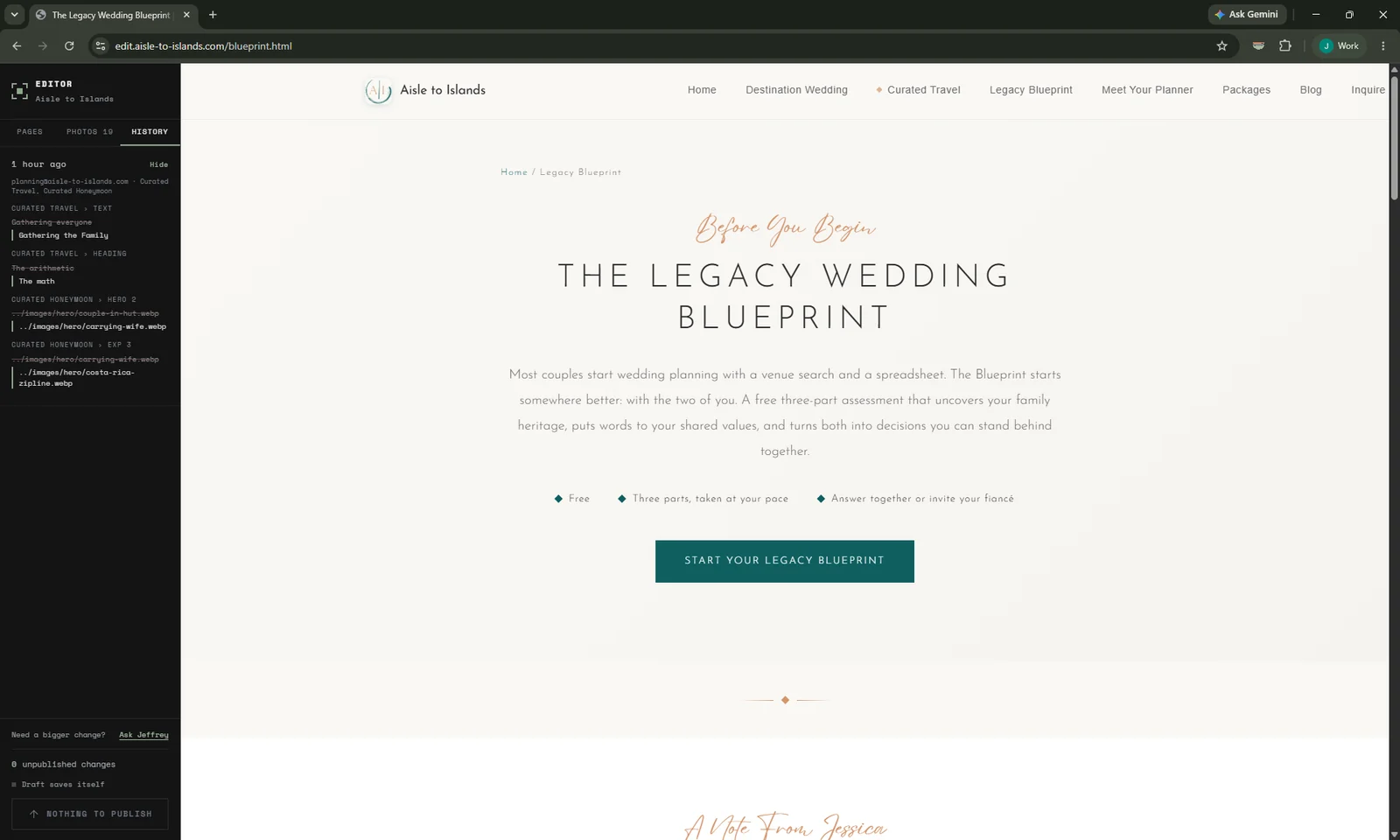
History records each publish, who made it, and what every line said before. Any version that has ever been live can be put back, so a change you regret a month later is still a change you can take back.
Your work saves itself
A draft is kept as you type and waits for you. Close the tab, come back next week, it is still there.
Nobody shares a login
Each person signs in as themselves, and every publish records who made it. Remove someone and their access ends the same day.
Two people, no collisions
If two people change the same sentence, the second is told rather than quietly overwriting the first.
A computer, not a phone
Editing needs a panel beside your page. Opening the link on a phone says so rather than loading something unusable.
What It Comes With
On a managed plan.
Managed plans
IncludedEditor comes with every managed plan at no extra charge, from launch day. Those plans are Essentials, Growth and Application, the monthly service that runs after launch; they are not the build tiers, which are Foundation, Site + Systems and Custom Application. It runs on my infrastructure alongside your hosting, which is why there is no separate bill for it and nothing for you to set up.
Build and hand off
Not includedYou receive and own the complete source code, so your site stays fully editable by you or any developer you hire, directly in the code. Editor itself is part of the managed service and stays on my infrastructure. It is not withheld as leverage, it is simply the thing the monthly fee runs.
Questions
The ones that come up.
Do I need to install anything?
No. Editor is a web address you open in your browser and sign in to with your email. There is nothing to install, no password to remember, and no separate dashboard to learn.
Can I break the design?
No. Only text and photos are editable. Layout, fonts, colours, spacing, navigation, and page structure are not reachable in Editor at all, so there is no setting to get wrong and no warning to click past.
Does it work on my phone?
No, Editor is a desktop tool. It puts a working panel beside your live page, and swapping a photo means seeing it at a real size, neither of which fits on a phone. Opening the link on a phone shows a short note saying so rather than loading something unusable. Your website itself works on every device as normal.
What if I publish something and regret it?
Before publishing, every change is listed with its before and after and can be undone one at a time. After publishing, History keeps every version that ever went live, so any of them can be put back.
Can more than one person edit?
Yes. Each person signs in with their own email address, and every published change records who made it. If two people change the same sentence, the second is told rather than quietly overwriting the first.
Do I need to know HTML?
No. You click the words on the page and type. There is no code, no formatting menu, and no way to paste something in that breaks the page.
Is it included in my plan?
Editor is included on every managed plan at no extra charge. It is not part of a build and hand off: on a hand off you receive and own the full source code, so your site stays editable by you or any developer you hire, directly in the code.
What if I need a bigger change?
There is an Ask button at the bottom of the panel. It emails me with the page you were on and what you need, so a request for something structural does not mean hunting for the right address. Managed plans include change hours; anything beyond them is quoted first.
See it on your own site.
You have just used it on mine. The next useful step is looking at what it would reach on yours, which takes a conversation and about twenty minutes.